door TESLA MODEL X 2016 Owner's Manual
[x] Cancel search | Manufacturer: TESLA, Model Year: 2016, Model line: MODEL X, Model: TESLA MODEL X 2016Pages: 179, PDF Size: 4.3 MB
Page 1 of 179

Overview............................................................. 2
Interior Overview.........................................................................2
Exterior Overview....................................................................... 3
Opening and Closing..................................... 4 Doors............................................................................................... 4
Keyless Locking and Unlocking 4Using the Key 4Opening Doors from the Interior 6Opening and Closing Front Doors from Outside Model X 7Opening and Closing Falcon Wing Doors 7Interior Locking and Unlocking 8Child-protection Lock 9Drive-away Locking 9Walk-away Locking 9Unlocking When the Key Doesn
Page 2 of 179
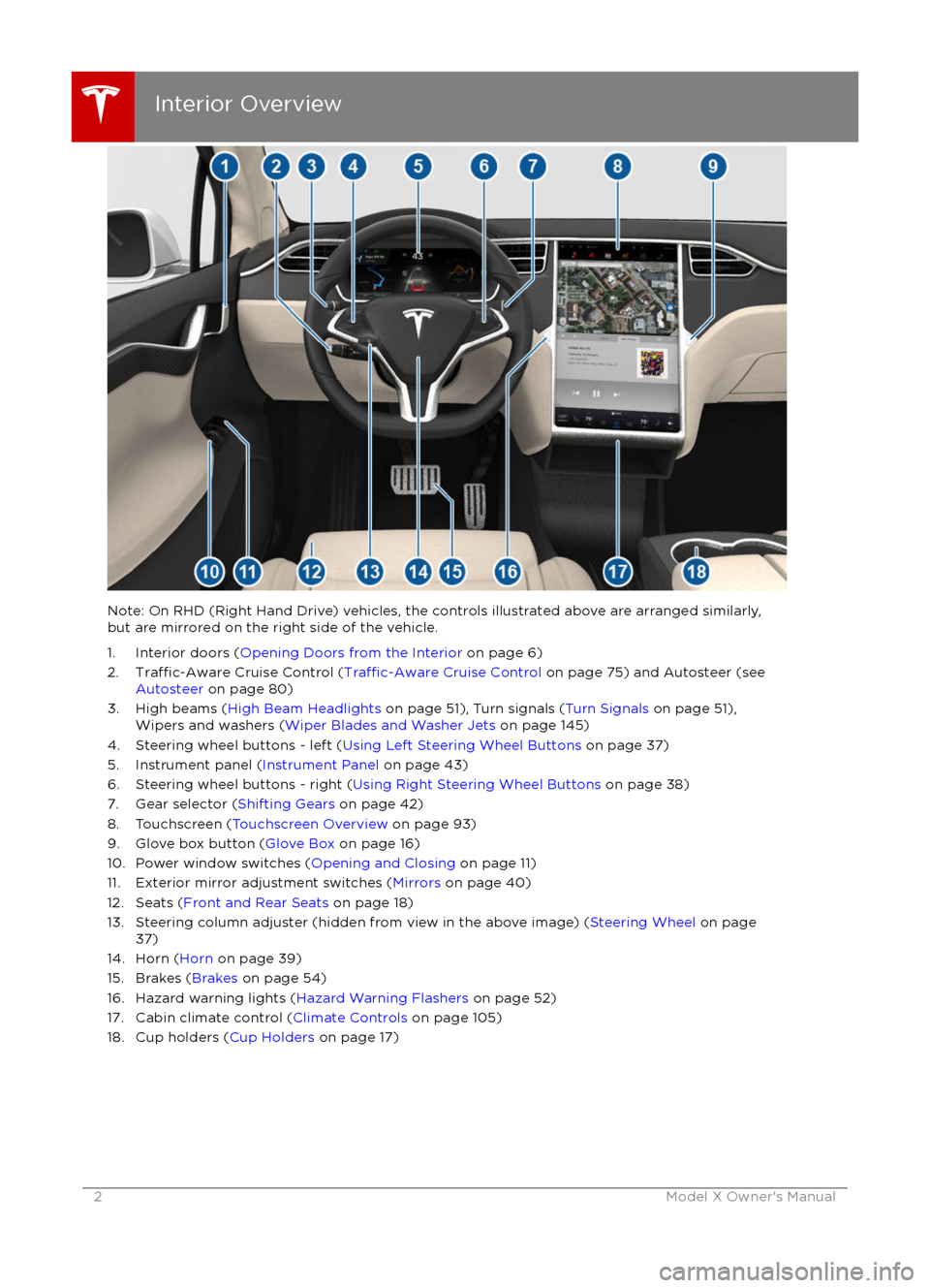
Note: On RHD (Right Hand Drive) vehicles, the controls illustrated above are arranged similarly,but are mirrored on the right side of the vehicle.
1. Interior doors ( Opening Doors from the Interior on page 6)
2.
Traffic-Aware Cruise Control (Traffic-Aware Cruise Control on page 75) and Autosteer (see
Autosteer on page 80)
3. High beams ( High Beam Headlights on page 51), Turn signals ( Turn Signals on page 51),
Wipers and washers ( Wiper Blades and Washer Jets on page 145)
4. Steering wheel buttons - left ( Using Left Steering Wheel Buttons on page 37)
5. Instrument panel ( Instrument Panel on page 43)
6. Steering wheel buttons - right ( Using Right Steering Wheel Buttons on page 38)
7. Gear selector ( Shifting Gears on page 42)
8. Touchscreen ( Touchscreen Overview on page 93)
9. Glove box button ( Glove Box on page 16)
10. Power window switches ( Opening and Closing on page 11)
11. Exterior mirror adjustment switches ( Mirrors on page 40)
12. Seats ( Front and Rear Seats on page 18)
13. Steering column adjuster (hidden from view in the above image) ( Steering Wheel on page
37)
14. Horn ( Horn on page 39)
15. Brakes ( Brakes on page 54)
16. Hazard warning lights ( Hazard Warning Flashers on page 52)
17. Cabin climate control ( Climate Controls on page 105)
18. Cup holders ( Cup Holders on page 17)
Interior Overview
2Model X Owner
Page 3 of 179

1. Exterior lights (Lights on page 48)
2. Front doors ( Opening and Closing Front Doors from Outside Model X on page 7)
3. Falcon wing doors ( Doors on page 4)
4. Charge port ( Charging Instructions on page 128)
5. Active spoiler ( Active Spoiler on page 66)
6. Forward looking camera ( About Driver Assistance on page 72)
7. Exterior mirrors ( Mirrors on page 40)
8. Radar sensor (hidden from view in the above image)( About Driver Assistance on page 72)
9. Hood/Front trunk ( Front Trunk on page 14)
10. Wheels and tires ( Wheels and Tires on page 160)
11. Rear view camera ( Rear View Camera on page 65)
12. Rear trunk/liftgate ( Rear Trunk on page 12)
13. Ultrasonic sensors ( Park Assist on page 57 and About Driver Assistance on page 72)
Exterior Overview
Overview3
Page 5 of 179

4. Falcon wing doors
Page 7 of 179

Opening and Closing Front Doors
from Outside Model X
Model X doors are electrically powered. When
you approach Model X carrying the key, all
doors unlock. To open a door, press the
handle. You can set the driver
Page 8 of 179

Note: If Model X is locked, pulling the switch(illustrated above) the first time unlocks the
associated door. Pulling it a second time
opens it.
To close a falcon wing door, press the button located on the inside of the door. You can also
use the key (see Using the Key on page 4,
push the switch on the door pillar (illustrated
above), or touch Control > Doors > Close on
the touchscreen:
Note: To prevent children from opening falcon
wing doors using the interior switch, turn on
child-protection locks using the touchscreen (Controls > Settings > Vehicle > Child
Protection Lock). See Child-protection Lock
on page 9.
Warning: Whenever a front door is
partially open (approximately 20
Page 9 of 179

Note: If a door or trunk is still open when you
lock Model X, it locks when you close it.
Child-protection Lock
Model X has child-protection locks on the falcon wing doors and liftgate to prevent them
from being opened using interior handles. Use the touchscreen to turn child protection lockson or
off. Touch Controls > Settings >
Vehicle > Child Protection Lock.
Note: It is recommended that you turn child- protection locks on whenever children are
seated in the rear seats.
Drive-away Locking
Model X automatically locks all doors
(including the trunks) whenever your driving
speed exceeds 8 km/h.
Walk-away Locking
Doors and trunks can automatically lock whenever you walk away carrying the key.
To turn this feature on or
off, touch Controls >
Settings > Vehicle > Walk-Away Door Lock.
Note: If all doors are closed and you use the
key to unlock Model X, walk-away locking is
temporarily suspended for one minute. If you
open a door within this minute, it does not re-
lock until after all the doors are closed and
you have walked away with the key.
Unlocking When the Key Doesn
Page 10 of 179

1. Center of the rear bumper.
2. Left side door pillar between first and
second row seating positions.
3. Right side door pillar between
first and
second row seating positions.
4. Center console.
5. Center for front trunk.
Warning: Radio waves can adverselyaffect electric medical equipment. People
with implanted pacemakers should
contact the electric medical equipment
manufacturer for the possible
influencesbefore use.
Doors
10Model X Owner
Page 14 of 179
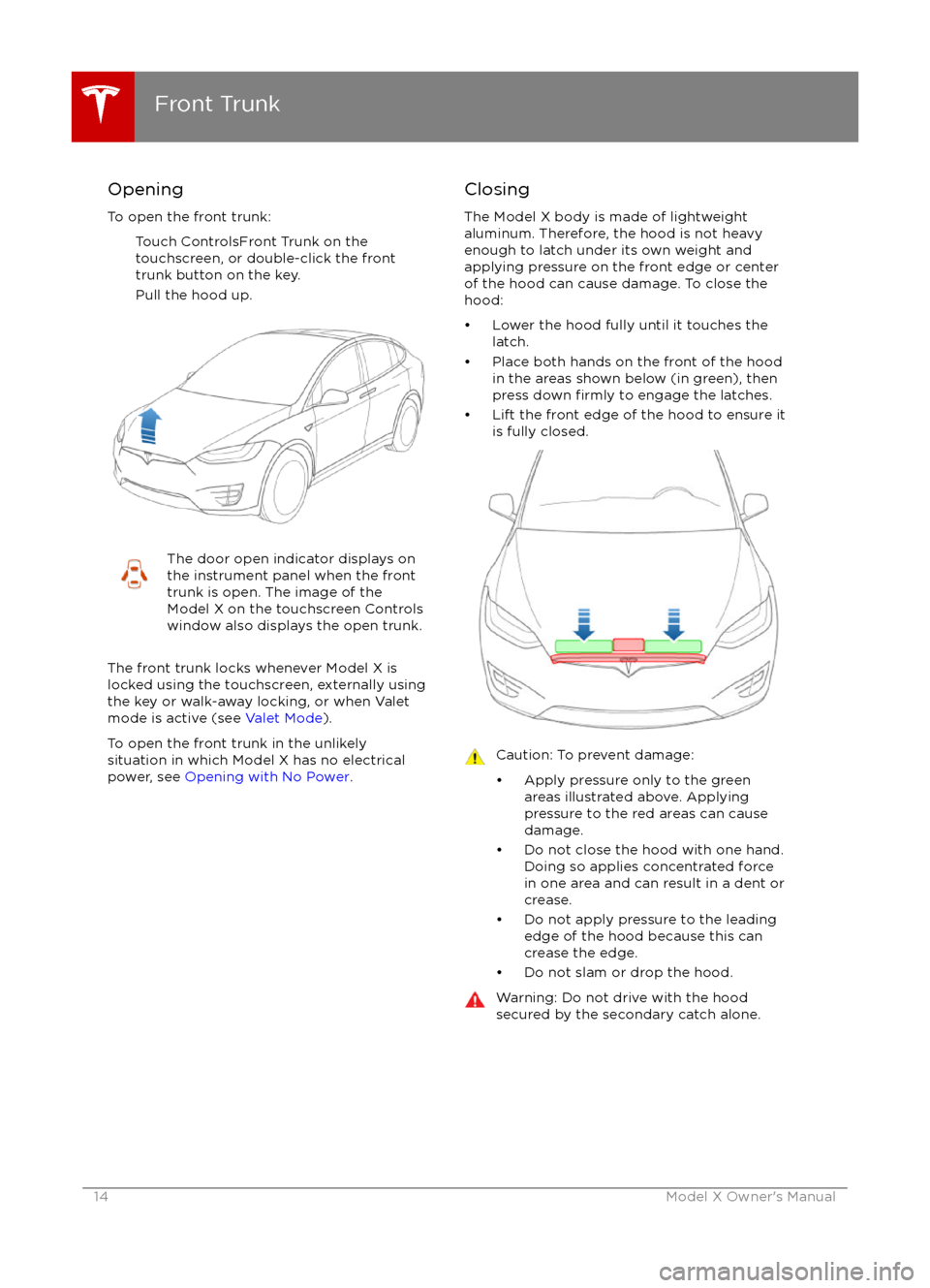
Opening
To open the front trunk: Touch ControlsFront Trunk on the
touchscreen, or double-click the front
trunk button on the key.
Pull the hood up.The door open indicator displays on
the instrument panel when the front
trunk is open. The image of the
Model X on the touchscreen Controls window also displays the open trunk.
The front trunk locks whenever Model X is
locked using the touchscreen, externally using
the key or walk-away locking, or when Valet
mode is active (see Valet Mode).
To open the front trunk in the unlikely
situation in which Model X has no electrical
power, see Opening with No Power .
Closing
The Model X body is made of lightweight
aluminum. Therefore, the hood is not heavy
enough to latch under its own weight and
applying pressure on the front edge or center of the hood can cause damage. To close the
hood:
Page 20 of 179

Note: When an outside seat has tilted forward
for easy entry, its back rest resets to the
neutral position and may need to be re-
adjusted.
Note: If an obstacle is detected while a seat is
moving forward for easy entry, forward
movement stops and the seat moves back.
Folding Third Row Seats
Before folding, remove items from the seats
and the rear foot well. To allow the third row
seat backs to fold completely
flat, you may
need to move the second row seats forward.
To fold a third row seat, press the button
located in the top outside corner of the seat.
The button has two detents.
1. Fold head restraint forward.
2. Fold seat forward.
You can also use the touchscreen to fold third
row seats. Touch Controls > Doors > Rear
Seats. A convenient way to fold rear seats is to engage Cargo Mode (described next).
Note: If necessary, the second row seat may
move forward slightly to accommodate the forward position of the third row seat.
Note: To raise the seats, pull the seat back
upward until it latches into place. To
confirmthe seat back is locked in the upright position, try pulling it forward.
Warning: Always ensure the seat backs
are locked in their upright position.
Failure to do so increases the risk of injury.Cargo Mode
Cargo Mode makes it easy for you to
maximize cargo space by automatically
moving all second row seats fully forward and
folding the third row seats
flat. Touch
Controls > Doors > Rear Seats > Cargo Mode
on the touchscreen.
Note: Cargo mode is prohibited if a second or
third row seat is occupied.
Head Restraints Front seats include adjustable non-removable
head restraints. Use the touchscreen to adjust
these head restraints to either a low or high
position.
The second and third row seats have
integrated non-removable head restraints that
can not be adjusted. However, the head
restraints in the third row seats can be folded
down for storage (see Folding Third Row
Seats on page 20).
Seat Heaters
The front seats are equipped with heating
pads that operate at three levels from 3
(highest) to 1 (lowest). To operate the seat
heaters, see Climate Controls on page 105.
If Model X is equipped with the optional cold
weather package, you can also control seat
heaters in the second row and rear seats, as
well as heated wipers by touching Controls >
Cold Weather (see Controls on page 97).
Seat Covers Do not use seat covers on Model X. Doing so
could restrict deployment of the side air bags
if an accident occurs. It can also reduce the
accuracy of the occupant detection system.
Front and Rear Seats
20Model X Owner